Your stock, week by week, for the months ahead.
Every product rolled forward one week at a time: what you're forecast to sell, what lands from your purchase orders, what you'll have on hand and how many weeks it covers. Spot the weeks you're forecast to run short while there's still time to act.
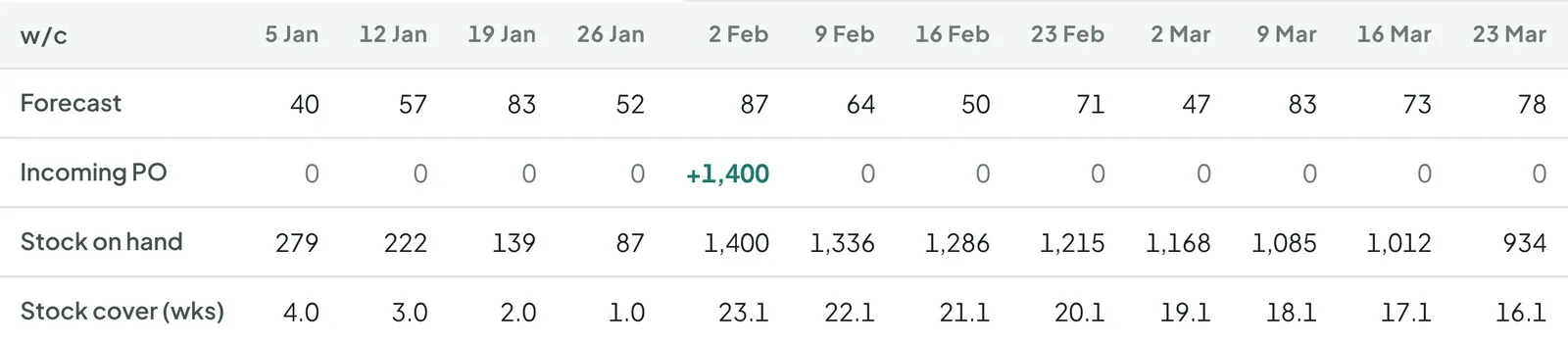
The weekly stock forecast in FloPlanner, running on demo data. Details may change before launch.
From your sales to the weeks ahead, in three steps
Bring in your numbers
Starter syncs Shopify sales, products and stock. Advanced takes every channel you sell on.
Tell it about your suppliers
Production and transit weeks, minimum order, and the safety buffer you want — set once per supplier, changed per product where it differs.
See the weeks ahead
Every product rolled forward week by week, with each purchase order landing in its week. Weeks forecast to run short stand out, with a suggested order date to review.
The weeks ahead first. Everything else follows from it.
Weekly stock forecast
Every product, every week: forecast, lost sales, incoming purchase orders, stock on hand and weeks of cover. Twelve weeks on screen at a time, up to a year ahead — the view planners build by hand in a spreadsheet, kept up to date for you.
Stock gap
The week each product is forecast to run short and by how many units, with incoming orders counted.
Seasonality
The forecast starts from your own sales history, so last year's peaks and quiet weeks carry into the plan.
Safety stock
Set how much stock you want to keep for each product, and see where it stands against that.
Lead time and order dates
Production and transit per supplier, changed per product where it differs. Suggested order dates take them into account, for you to review.
Air vs sea In development
When a sea order lands too late, weigh up flying part of it to cover the gap.
Purchase orders
Keep your open orders in one place, each counted in the week it's due to arrive.
Open any product to see what the gap costs
How many days the stock is forecast to last, when an order should go in, and the week it's forecast to run out — even with an order already on its way.
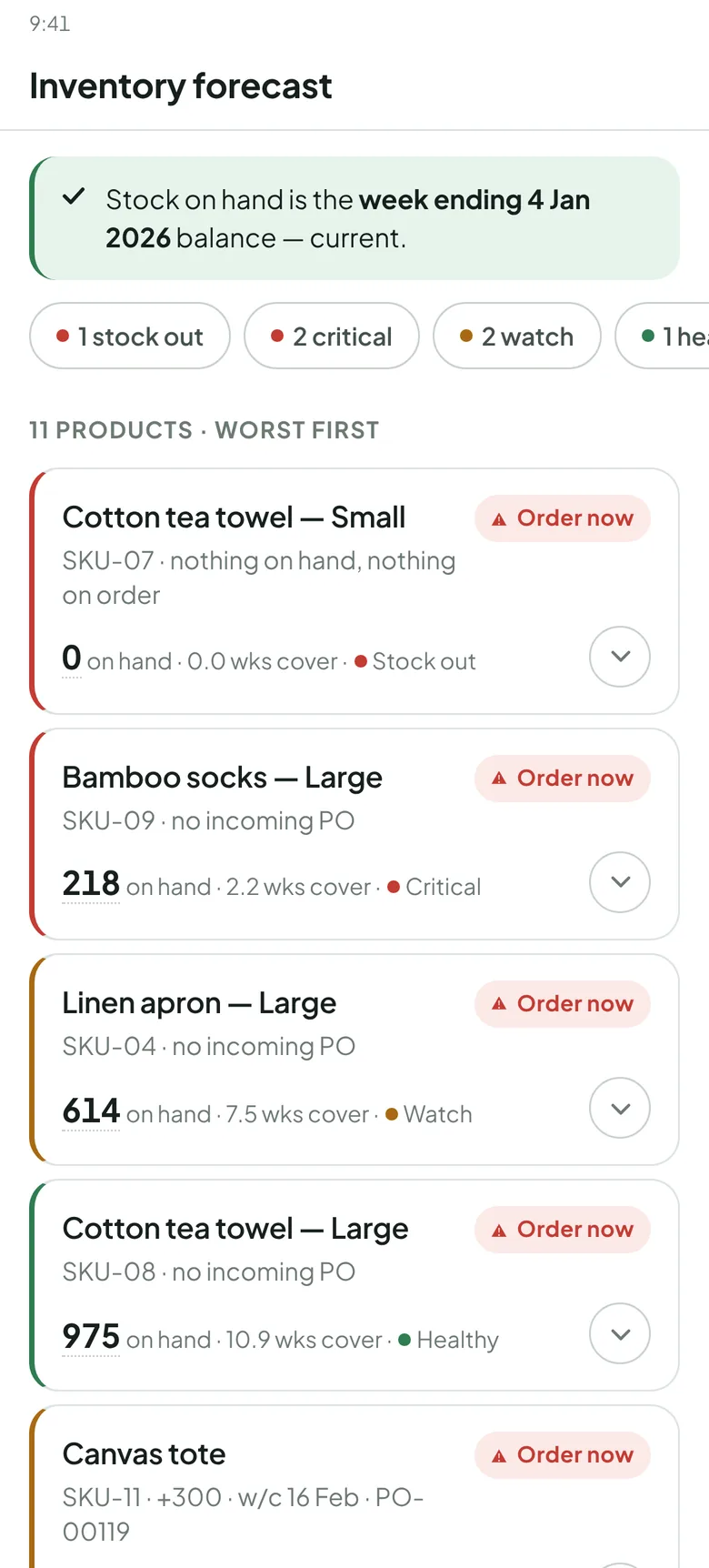
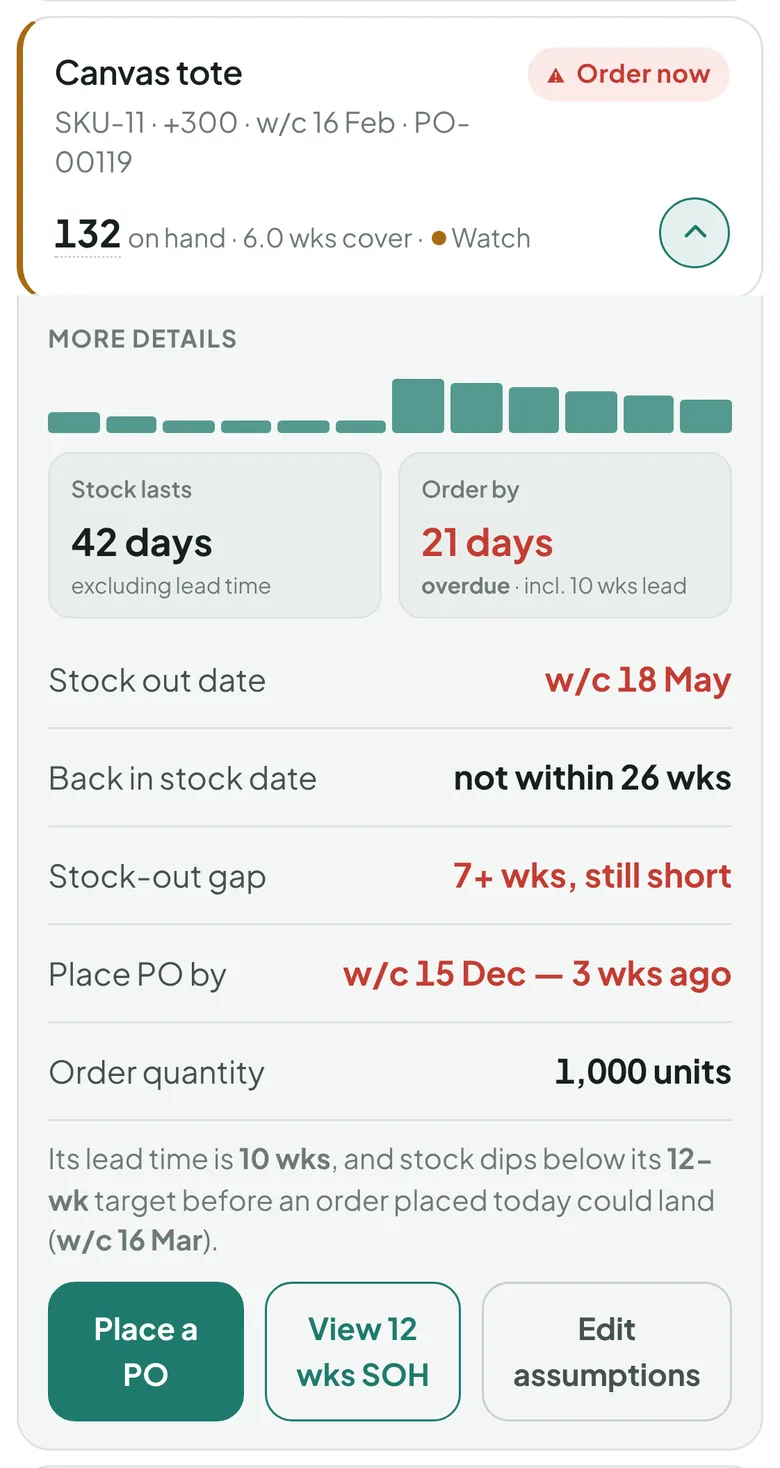
Screens from FloPlanner, running on demo data. Details may change before launch.
Two spreadsheets that come with Starter
Starter fills them from its own export, and you work out the order by hand. Not using the app yet? A stripped-down version of each is free to download here. Both follow the planner's method, so moving up to Advanced carries the work over.
Reorder worksheet
Filled from Starter's export: weekly forecast, current stock and open orders with their ETAs. You work out when to order and how much from lead time, safety weeks and minimum order. Advanced suggests both for you to review.
Request the free versionMonth-end 3PL stock check
Filled with Shopify stock at month end; you add your 3PL's count. The difference per product, valued at the latest purchase-order cost, is ready to post as an adjustment.
Request the free versionThree plans, one 30-day free trial
Every plan has the weekly stock forecast. Step up when you want suggested order dates and quantities to review.
- Weekly stock forecast, every product
- Syncs Shopify sales, products and stock
- Simple purchase-order entry
- Starter pack: reorder worksheet and month-end 3PL stock check, filled from your export
- Weekly stock forecast across all your sales channels
- Suggested order dates and quantities, for you to review
- Lead times, purchase orders, deposits
- Everything in Advanced, plus the weekly stock forecast on a desktop screen
- 30-minute planning session with the founder each month
- Limited places
Prices in US dollars, per month. 30-day free trial on every plan.
Inventory planning, answered
What is a weekly stock forecast?
A week-by-week table for each product: the sales forecast, sales lost to stock-outs, purchase orders arriving, stock on hand at the end of each week and how many weeks of sales it covers. Twelve weeks show at a time, and you can step ahead up to a year. It rolls forward every week.
What does FloPlanner do?
It forecasts demand for each product, rolls your stock forward week by week with the purchase orders you already have coming, and shows which weeks look short. Advanced adds suggested order dates and quantities for you to review.
Who is it for?
Shopify brands that buy stock from overseas suppliers, where lead times run to months and a late order means weeks out of stock.
How is the forecast worked out?
From your own sales history, product by product, so seasonal peaks and quiet weeks carry into the plan. Weeks you were out of stock aren't read as low demand.
Does it replace Shopify's purchase orders?
Purchase orders are entered in the planner, so their arrival dates count in the weekly stock forecast. Starter keeps entry simple; Advanced adds lead times, deposits and shipments.
How much does it cost?
Starter is US$25 a month on the Shopify App Store, Advanced US$49 a month on iPhone and Android, Advanced Plus US$99 a month with a desktop web app and a monthly planning session. Every plan has a 30-day free trial.
Request early access
Early access runs through November and December 2026, ahead of the January 2027 launch.
When the business outgrows one app
Floridge also sets up inventory systems and runs planning engagements for growing FMCG brands — the same planner behind the app, working inside your numbers.
- 1Plan with the app
- 2Set up your inventory system
- 3A planning engagement, built in place